
Modo - Computer Music Player2.6b - Get APK
You'll be able to download in few seconds.
Publisher Description
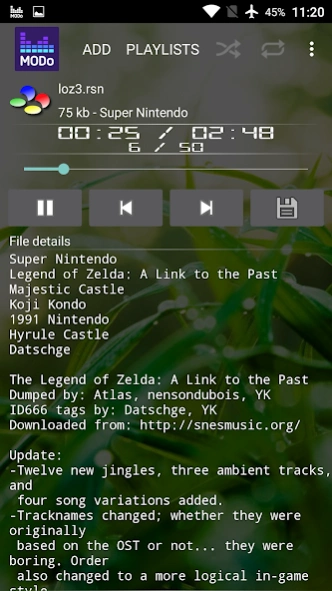
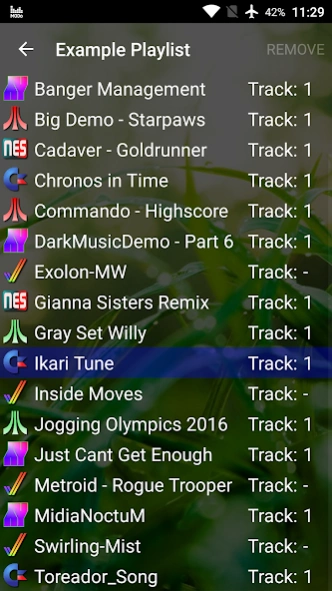
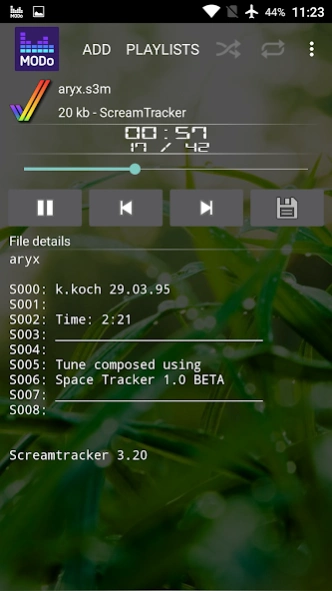

Play C64 Sid, SNES/NES, Amiga Tracker files & more. Sleep timer & volume boost.
Allows you to playback some 8 / 16 bit computer music. Hear your favourite computer tunes on the go.
How to use
* Simple, copy your tunes on your sdcard / internal memory. Start Modo and browse to the directory and touch the file.
*
To terminate the playback service, pause the music and hit the back button.
Features
• Sleep timer
• Shuffle
• Loop
• Volume boost
• HVSC #63 songlength database builtin
• Zip file browsing (warning: requires more RAM, do not use on low memory situation as player is more prone to get killed because of bigger memory footprint).
Files supported
• Tracker modules:
MOD, XM, IT, S3M, MED (only MDD0/MDD1), OKT
• Commodore C64 (Stereo-SID supported):
SID, MUS
• Nintendo:
GBS, NSF, NSFE, SPC, RSN
• Sega Mega Drive / Master System:
GYM, VGM (no FM), VGZ
• Atari / Amstrad CPC / Spectrum (+TurboSound):
SAP, AY, YM
• Msx / PC-Engine:
KSS, HES
Playlists
The playlists are stored in the internal storage of the phone. It is using SQLite3+ provided by each Android phone. Google cloud backup support is implemented, to activate go to Phone settings->Privacy/Backup->Backup up my data.
If your phone is rooted you can simply backup the app data by using e.g. Titanium Backup.
If you have questions you can contact me at wb@illogical.de
Enjoy some nice tunes!
Misc Resources
* Example playlist - http://illogical.de/modo/playlist.zip
* AYGOR - Great AY collection - http://abrimaal.pro-e.pl/zx/aygor.htm
About Modo - Computer Music Player
The company that develops Modo - Computer Music Player is Bastian Pflieger. The latest version released by its developer is 2.6b.
To install Modo - Computer Music Player on your Android device, just click the green Continue To App button above to start the installation process. The app is listed on our website since 2016-06-25 and was downloaded 0 times. We have already checked if the download link is safe, however for your own protection we recommend that you scan the downloaded app with your antivirus. Your antivirus may detect the Modo - Computer Music Player as malware as malware if the download link to de.illogical.modo is broken.
How to install Modo - Computer Music Player on your Android device:
- Click on the Continue To App button on our website. This will redirect you to Google Play.
- Once the Modo - Computer Music Player is shown in the Google Play listing of your Android device, you can start its download and installation. Tap on the Install button located below the search bar and to the right of the app icon.
- A pop-up window with the permissions required by Modo - Computer Music Player will be shown. Click on Accept to continue the process.
- Modo - Computer Music Player will be downloaded onto your device, displaying a progress. Once the download completes, the installation will start and you'll get a notification after the installation is finished.
Program Details
System requirements
Download information
Pricing
Version History
version 2.6b
posted on 2016-06-25
2.6b:,* HVSC #64 song length update.,* Pause Music if headphone disconnects.,* Fade duration split into Fade in / Fade out.,* Player remembers last files loaded / playlist used.,* Error handling improved if too many files failed to load.,* User can set default Sid model.,* Italian translation by Filippo Scaboro.
version 1.8
posted on 2012-07-25
Several fixes and updates
Disclaimer
External Download
We do not host Modo - Computer Music Player on our servers. We did not scan it for viruses, adware, spyware or other type of malware. This app is hosted by Galad and passed their terms and conditions to be listed there. We recommend caution when installing it.
The APK Download link for Modo - Computer Music Player is provided to you by apps112.com without any warranties, representations or guarantees of any kind, so access it at your own risk.
If you have questions regarding this particular app contact the publisher directly. For questions about the functionalities of apps112.com contact us.
